Same Green Beans, One Batch Sour and One Bitter: Seven Questions Answered With a Moving Coffee Roaster Model
On October 22, 2026 I added a 74-part coffee roaster to the blog's lab that moves with the sliders, driven by a simplified roasting simulation. This post works through it as questions: the turning point, first crack, development time ratio, what heat and charge temperature each do, which numbers are common roasting guidance and which are just model output, and where the model goes wrong. A learning note, not advice.
Contents
- What actually happens during a ten-minute roast?
- Why does the curve dip at the start?
- How do light and dark roasts differ, and why is first crack at the same time?
- What do heat, airflow and charge temperature each control?
- Why should the rate of rise keep slowing, and what’s that drop right after first crack?
- Where is this model wrong?
- The code said “passed.” Why didn’t I trust it?
- One thing to take with you
DTR is just one piece of a complex puzzle.
—— Scott Rao, Development Time Ratio (2016)
On October 22, 2026, I put a moving coffee roaster on the blog: 74 solid parts and 3 pipes, with four sliders for charge temperature, heat, airflow and drop temperature, and a play button that squeezes a whole batch into 15 seconds. Underneath is a simplified simulation. At the defaults (charge 200°C, heat 70%, airflow 50%, drop 215°C) it gives a turning point at 1:20, first crack at 8:02 and the drop at 10:09, for a development time ratio of 20.9%, a medium roast. All of these are model output. They’re fine for telling which way to turn a knob. They won’t predict your next batch on your own machine.
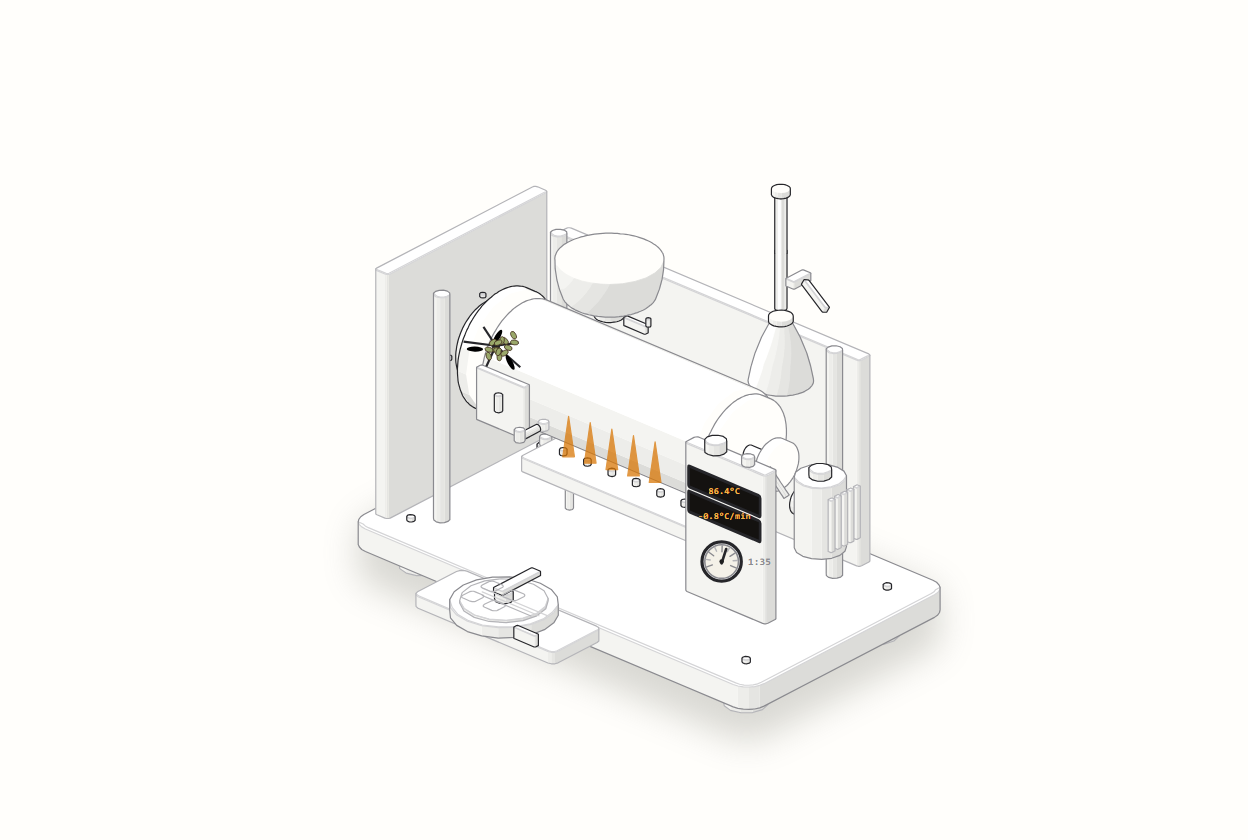
👉 Open the roaster lab and roast a batch yourself
What actually happens during a ten-minute roast?
Roughly three stages. First the water gets driven out, then the beans turn yellow and brown and build aroma, and finally you hear a popcorn-like crackle called first crack. The stretch from first crack to the drop is the development phase.
Green coffee usually holds 10–12% moisture (the range often cited from the Specialty Coffee Association), and the drying phase is usually said to end around 150–160°C bean temperature, when the beans turn yellow. Turning yellow doesn’t mean the water is gone, though; beans keep losing moisture the whole way. First crack happens at roughly 196–210°C bean temperature, with the caveat that this is a probe reading and machines can disagree by more than ten degrees. A batch on a small commercial drum roaster mostly runs 10–15 minutes.
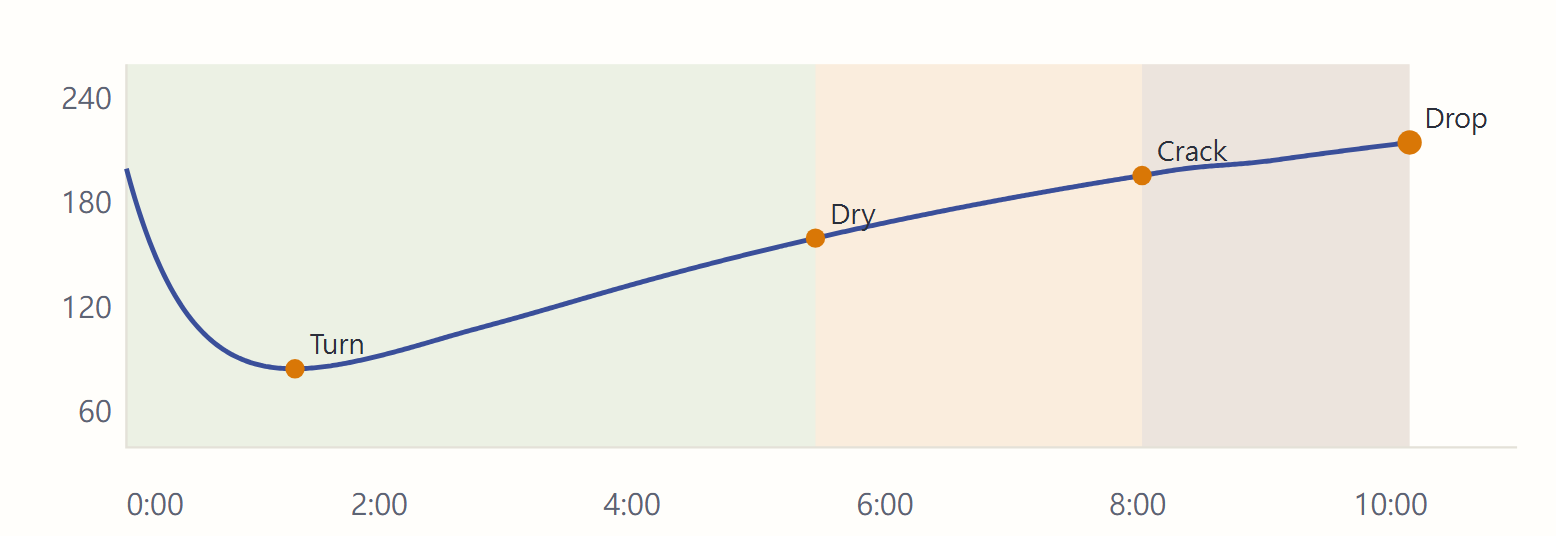
The model’s defaults land inside those ranges: drying ends at 5:27, first crack at 8:02, the drop at 10:09. What surprised me the first time I watched the curve was how much of the first half is spent on drying, where it looks like nothing much is happening.

Why does the curve dip at the start?
The beans aren’t getting colder. The probe sits in a drum that’s already hot, so before the charge it’s reading hot metal and hot air. Cold beans pour in and wrap around it, the reading falls, and only once the beans warm up does the curve turn and climb. The lowest point is the turning point. In real roasting it usually shows up within a minute or two of charging, depending on the machine and charge temperature.
The model works the same way: the probe itself takes time to warm, so the reading falls before it rises. A few settings side by side:
| Setting | Turning point time | Turning point temperature |
|---|---|---|
| Default (charge 200°C, heat 70%) | 1:20 | 85.1°C |
| Heat too low (heat 35%) | 1:35 | 72.5°C |
| Charge too hot (charge 228°C, heat 90%) | 1:17 | 97.9°C |
(All model output.) Less heat makes the dip deeper and later; a hotter charge makes it shallower. So the turning point works like a starting whistle: it tells you how hard this batch took off, not how hot the beans really are.

How do light and dark roasts differ, and why is first crack at the same time?
Flip between the “light” and “dark” presets in the lab and first crack lands at 8:02 both times. The only difference is how long the batch keeps going afterward:
| Preset | Drop temp | First crack | Drop | Development time ratio | Model’s warning |
|---|---|---|---|---|---|
| Light | 207°C | 8:02 | 9:18 | 13.6% | Underdeveloped |
| Medium (default) | 215°C | 8:02 | 10:09 | 20.9% | None |
| Dark | 230°C | 8:02 | 12:07 | 33.7% | Overdeveloped |
Development time ratio is simply the share of the batch between first crack and the drop. Real roasts commonly fall at 15–25%. Coffee roasting author Scott Rao recommends 20–25% for most roast levels, but he also says machines with a lot of heat relative to batch size can go down to about 15%, and that the ratio is only one indicator among several. That’s why his line opens this post.

First crack landing at the same time is a design choice in the model: it fires first crack when the bean’s own temperature crosses a fixed threshold, and the drop temperature only decides how long to wait after that. Real beans aren’t that tidy; origin, moisture and batch size all nudge first crack earlier or later. Also, the dark preset drops at 230°C, which reaches the range usually given for second crack (around 225–230°C), but the model has no second crack in it, so it can’t tell you when that would arrive.
In the real world, one common way to measure roast color is an Agtron meter, where lower numbers mean darker. On Coffee Review’s scale, above 70 is light and below 50 is dark. Whole bean versus ground, and which scale you use, change the numbers a lot, so say which one you mean when you quote one. Weight tells you too: a light roast typically loses about 12% and a dark roast about 20%, with extremes from 10% to 25%. The model calculates neither.
What do heat, airflow and charge temperature each control?
In the model, heat sets how hot the air is, so more heat pushes the whole curve earlier. Opening the airflow blows that air through more often and moves heat in faster, but also carries more heat away. Charge temperature is heat the drum has stored up; it gives the start a push and then fades.
The two extremes show the difference best. Drop the heat to 35% and drying doesn’t finish until 10:19, and the beans never reach the drop temperature within 20 minutes, so the batch never finishes. Go the other way, charge at 228°C with 90% heat, and first crack comes early at 5:55 with the drop at 7:14. The model warns that the surface may scorch first: the outside has colored before the inside catches up.

Real machines have one more knob the model doesn’t: drum speed. A 1 kg drum commonly turns at about 60–75 rpm, smaller drums spin faster, and 40–60 rpm is the range for large machines. The speed depends on the drum’s size, not on how many beans are in this batch. Spin too fast and centrifugal force pins the beans to the drum wall, which actually makes heat transfer worse.
Why should the rate of rise keep slowing, and what’s that drop right after first crack?
According to Rao, the rate of rise (how many degrees the bean temperature climbs per minute) should keep falling throughout the batch, and the crash often seen at first crack, followed by a flick back up, is the main cause of baked coffee (the flat, dull flavor). His explanation is that at first crack the bean cores release a lot of moisture in a short time, that moisture is cooler than the bean surface and the probe, and it drags the curve down.

That’s Rao’s claim, and some in the industry dispute it. In my model, first crack briefly releases heat and then absorbs it, so the rate of rise dips. That only mimics the shape of the curve; it doesn’t mean the model proves his argument.
Where is this model wrong?
Four places I know about:
- It treats the whole batch as one bean and only computes heat transfer and drying. A 2025 paper in Frontiers in Food Science and Technology points out that beans start generating their own heat from about 150°C, and models that leave this out underestimate bean temperature, so the second half is bound to drift.
- First crack fires at a fixed threshold. There’s no second crack and no drum speed.
- It doesn’t know your beans: origin, moisture and batch size all bend the curve differently under the same settings.
- It doesn’t know where your probe sits. On the same batch, probe placement alone can move readings by more than ten degrees, so a number like “first crack at X degrees” often won’t carry over to another machine.
I use it like a compass needle. Too little heat drags the curve; waiting too long after first crack overshoots. The direction is right. How far to turn each knob still means roasting a real batch, tasting it and writing it down.
The code said “passed.” Why didn’t I trust it?
Because that “passed” came after checking 0 parts in 0.0 seconds. After drawing the machine, a set of checks runs automatically to see whether parts pass through each other and whether the pipes connect. The first run said “passed,” and I nearly called it a day before looking at the numbers again. The same checks had covered 111 parts on the espresso machine before it.
The cause was tiny. The drawing code was missing one line that hands the parts to the checker, so the checker got an empty list and naturally found nothing wrong. With that line added it really checked 74 parts and caught 1 problem: one end of the drive belt touched the outline of the drum housing on screen. Moving it 0.4 units fixed it.

Two smaller traps turned up the same day. The English labels on the machine came out half in Chinese for a while. The page is written in Chinese first, and a table swaps each Chinese phrase for its English version, in order. The short Chinese word for “airflow” got swapped first, so every longer Chinese sentence containing it no longer matched its entry in the table and stayed untranslated. A test written specifically to check language still passed. The fix was to replace long phrases first and short words last. The other was that in the light theme the display text was hard to read, so I gave the display a fixed dark background with amber text, the way a real LCD looks, instead of following the theme.
All three had the same shape: the result looked fine, and nobody had asked what it actually looked at.
One thing to take with you
Whether a “passed” is worth trusting depends on how many things it checked. I only picked up this habit after that 0-parts result gave me a scare. Next time you see something like “all clear” or “scan complete, no issues,” whether it’s an antivirus scan, a bookkeeping app’s reconciliation or a checklist, find out how many items it actually checked and write that number next to it. If you can’t find a number, or the number is 0, note that “passed” down as “don’t know yet.”
Comments
Loading comments…